

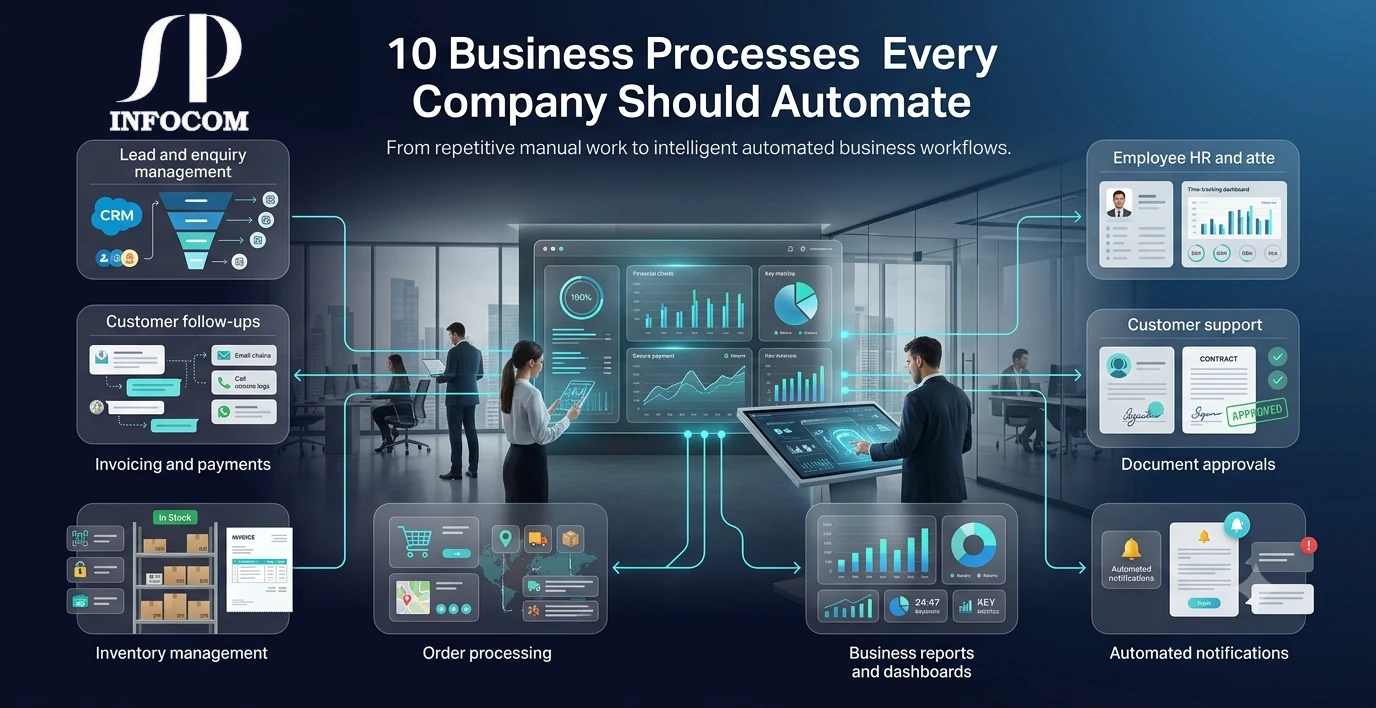
Every business has repetitive tasks that consume valuable time without directly contributing to growth. From responding to customer enquiries and processing orders to preparing reports and sending reminders, employees often spend hours performing activities that can be handled more efficiently through automation.
Business process automation helps companies reduce repetitive work, minimize human errors, improve productivity, and create more consistent workflows. Automation does not mean replacing people. Instead, it allows employees to spend more time on important activities such as customer relationships, strategy, problem-solving, and business development.
Whether you run a small business, a growing company, or a large organization, identifying the right processes to automate can have a significant impact on operational efficiency. In this guide, we explore ten business processes that companies should consider automating.
What Is Business Process Automation?
Business process automation is the use of software and technology to perform repetitive business tasks with minimal manual intervention. Automated workflows can connect different departments, systems, employees, and customers while ensuring that information moves efficiently from one stage to another.
A well-designed automation system can handle tasks such as notifications, approvals, data entry, document generation, customer communication, reporting, and workflow management.
The goal is simple: reduce unnecessary manual work and allow your team to focus on activities that require human judgment and creativity.
1. Lead and Enquiry Management
Managing leads manually can quickly become difficult as the number of enquiries increases. Sales teams may miss follow-ups, forget important details, or lose track of where a potential customer is in the sales process.
An automated lead management workflow can capture enquiries from websites, mobile applications, social media, email, and other channels and automatically assign them to the appropriate salesperson.
- Automatically capture new enquiries
- Assign leads to sales representatives
- Send follow-up reminders
- Track lead status and conversion
- Generate sales reports
2. Customer Follow-Ups
Consistent follow-up is important for converting prospects into customers and maintaining relationships with existing clients. However, relying entirely on employees to remember every follow-up can lead to missed opportunities.
Automated reminders and communication workflows can notify sales teams when action is required and send scheduled messages based on predefined business rules.
This creates a more consistent customer experience while reducing the amount of repetitive administrative work performed by sales teams.
3. Invoicing and Payment Management
Creating invoices, tracking payments, sending reminders, and maintaining financial records can consume significant administrative time.
Businesses can automate invoice generation based on orders or completed services and automatically send invoices to customers. Payment status can also be updated within the system, while overdue payment reminders can be triggered automatically.
- Automatic invoice generation
- Payment status tracking
- Automated payment reminders
- Recurring billing workflows
- Financial reporting
4. Inventory Management
Inventory management becomes increasingly complex as a business grows. Manual stock updates can result in inaccurate information, stock shortages, excess inventory, and delays in order processing.
An automated inventory system can update stock levels whenever products are purchased, sold, returned, or transferred. Businesses can also configure alerts when inventory reaches a predefined level.
Automation gives managers better visibility into stock availability and helps them make faster purchasing and operational decisions.
5. Employee Attendance and HR Processes
HR departments often manage repetitive activities such as attendance records, leave requests, employee information, approvals, and internal notifications.
These processes can be streamlined through an HR management system where employees can submit requests digitally and managers can approve them through automated workflows.
- Attendance tracking
- Leave management
- Employee record management
- Approval workflows
- Automated notifications
6. Order Processing
Order processing often involves several departments, including sales, inventory, accounts, warehouse, and delivery. When information is transferred manually between teams, delays and errors can occur.
An automated order management workflow can move an order through different stages automatically. Once an order is confirmed, the system can update inventory, notify the relevant department, generate required documents, and update the customer about the order status.
7. Customer Support and Service Requests
Customer support teams deal with a large number of questions, complaints, service requests, and technical issues. Without a structured workflow, tickets can easily be overlooked or delayed.
Automated customer support systems can create tickets, assign them to the appropriate team, prioritize requests, and send notifications when an issue is updated or resolved.
This makes it easier for businesses to maintain service quality while giving customers better visibility into the status of their requests.
8. Reports and Business Dashboards
Preparing business reports manually can take hours, especially when information is collected from multiple departments or spreadsheets.
Automated dashboards can collect information from connected business systems and present important metrics in a centralized view. Management can monitor sales, revenue, inventory, customer activity, employee performance, and other key indicators without waiting for manually prepared reports.
Real-time reporting helps decision-makers identify problems earlier and respond to changing business conditions more effectively.
9. Document Approval and Internal Workflows
Many organizations still depend on emails, paper documents, and informal communication for approvals. This can make it difficult to know who needs to approve a document and where a request is currently located.
Automated approval workflows can route requests to the appropriate person based on predefined rules. Employees can receive notifications, managers can approve or reject requests digitally, and the complete history can be maintained within the system.
- Purchase approvals
- Expense approvals
- Leave approvals
- Document approvals
- Internal requests
10. Notifications and Reminders
Businesses send thousands of notifications and reminders every month. These may include appointment reminders, payment alerts, order updates, renewal notifications, task reminders, and internal announcements.
Instead of sending these messages manually, businesses can create automated notification workflows triggered by specific events or dates.
Automated communication saves time, reduces missed deadlines, and keeps customers and employees informed at the right time.
Benefits of Automating Business Processes
Automating the right processes can create measurable improvements across an organization. The biggest benefits include:
- Reduced repetitive manual work
- Fewer human errors
- Faster business operations
- Better employee productivity
- Improved customer experience
- Better visibility into business operations
- More consistent workflows
- Easier business scaling
What Should You Automate First?
Not every business process needs to be automated immediately. The best place to start is with tasks that are repetitive, time-consuming, rule-based, and performed frequently.
Start by identifying processes where employees spend a significant amount of time entering the same information, sending repetitive messages, preparing reports, checking statuses, or moving information between different systems.
Once these processes are identified, businesses can prioritize automation based on potential time savings, business impact, complexity, and return on investment.
Automation Does Not Mean Removing the Human Element
One of the biggest misconceptions about business automation is that it is designed to replace employees. In reality, effective automation should support employees rather than simply replace human involvement.
Routine tasks can be handled by software while employees focus on activities that require creativity, communication, strategic thinking, and human judgment. This combination of technology and human expertise can create a more productive and flexible organization.
Build Automation Around Your Business
Every company operates differently. A workflow that works for one organization may not be suitable for another. This is why businesses should evaluate their existing processes before selecting automation tools.
Depending on the business requirements, automation can be implemented using existing software, integrations, APIs, workflow platforms, ERP and CRM systems, or custom-built software solutions.
The objective should always be to create a system that fits the way the business actually works rather than forcing employees to adapt to an unsuitable process.
Final Thoughts
Business process automation can transform the way companies operate by reducing repetitive work, improving accuracy, and helping employees focus on higher-value activities. From lead management and customer support to inventory, payments, reporting, and internal approvals, there are many opportunities to make everyday business operations more efficient.
The most successful automation strategies begin with a clear understanding of business processes. Instead of automating everything at once, companies should identify the areas where automation can create the greatest impact and then expand gradually.
At SP Infocom, we help businesses design and develop technology solutions that simplify operations, connect business processes, and support long-term growth. From custom software and mobile applications to ERP, CRM, cloud solutions, and business automation, our solutions are designed around the unique requirements of each organization.